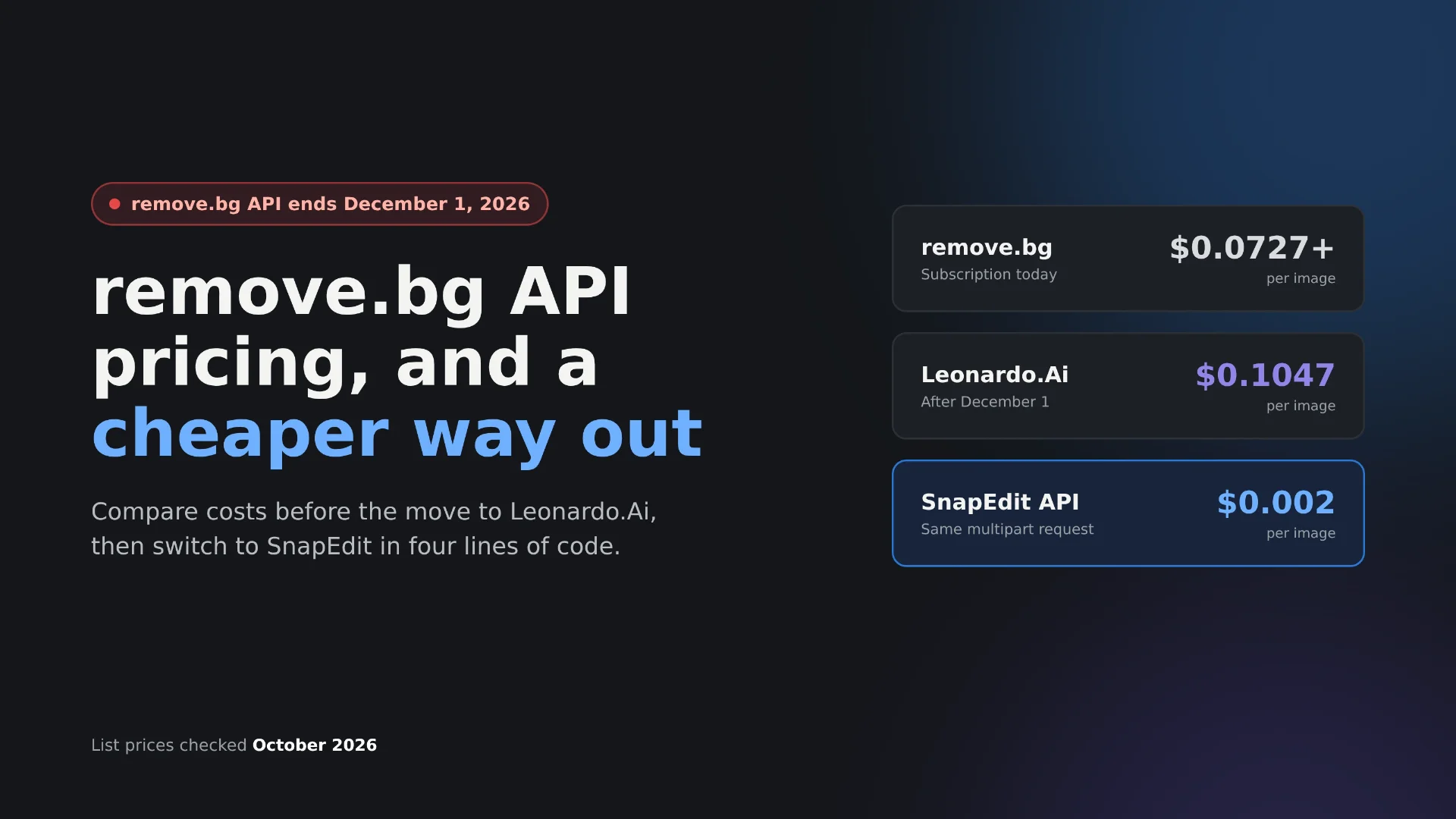
Remove.bg has announced it will stop its API on December 1, 2026. API traffic moves to Leonardo.Ai, which charges $0.1047 per image, and remove.bg API keys don't carry over.* SnapEdit API removes backgrounds for $0.002 per image is a good alternative*, and you just need to change four lines of code to switch from remove.bg
This guide covers what remove.bg costs today, what the same work costs after the move, the cheaper alternatives, and a step-by-step migration you can finish before the deadline.
Disclosure: SnapEdit publishes this article. Prices were checked on each provider's official pages in October 2026. Check the live pricing pages before you commit, because API prices change.
What is happening to the remove.bg API on December 1, 2026?
The standalone remove.bg service shuts down on December 1, 2026, at 9:00 a.m. CET. The website moves into Canva. The API moves to Leonardo.Ai, another Canva company.
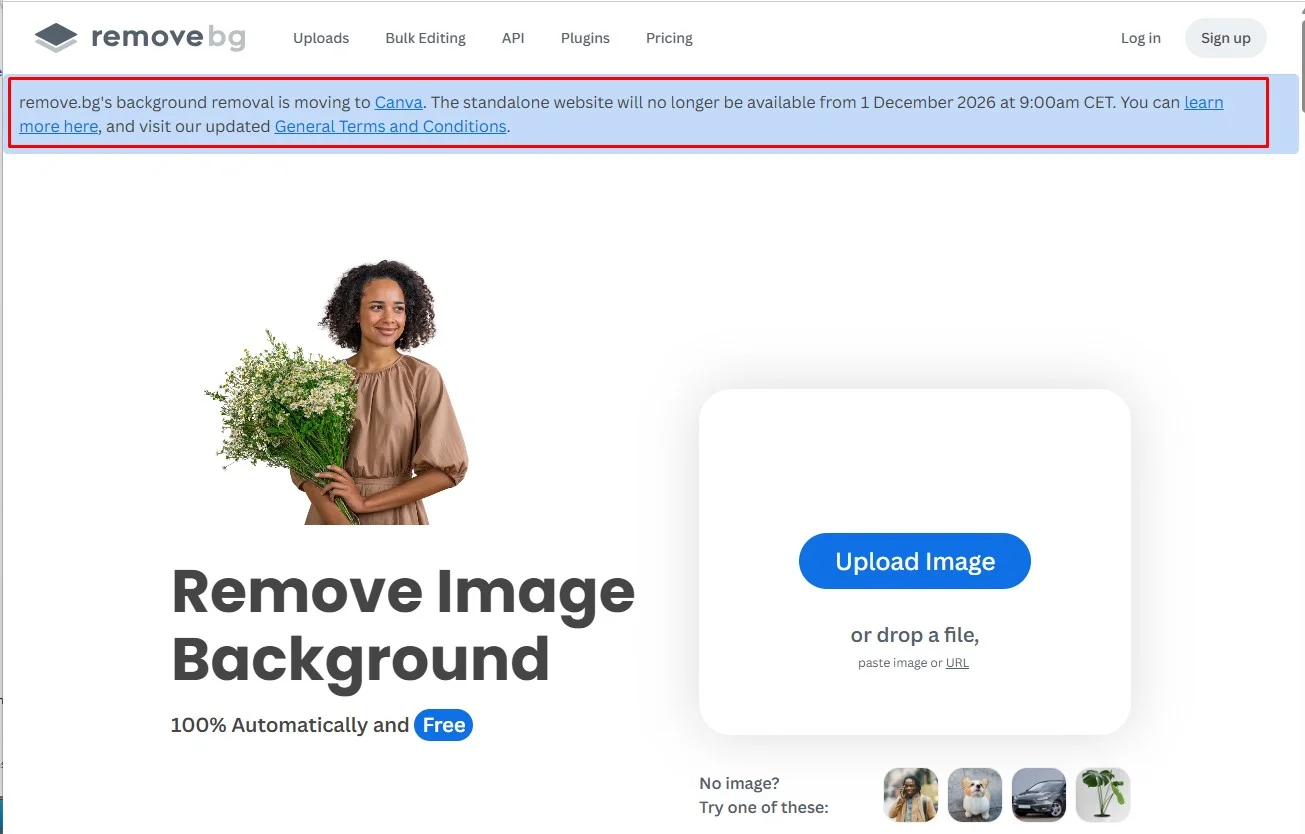
The API move is not a domain change. Leonardo.Ai states that remove.bg credentials don't carry over. You create a Leonardo.Ai account, generate a new API key, and update your integration to Leonardo's request format.
Who is affected:
- Teams that call the API directly. Any code that sends requests to
api.remove.bg/v1.0/removebgneeds a new provider. - No-code automations. Zapier, Make, and n8n workflows that use the remove.bg API stop working with the old key.
- Plugins and apps built on remove.bg. Store plugins and editing apps that call remove.bg in the background need an update from their developer.
People who remove backgrounds by hand on the website can keep doing it inside Canva. Their workflow continues.
Remaining credits. remove.bg hasn't published a clear statement about unused API credits after December 1. Check your balance now and plan to use it before the deadline.
How much does the remove.bg API cost today?
The remove.bg API costs between $0.0727 and $1.00 per image, depending on volume and plan. Most teams on a subscription pay between $0.0727 and $0.225. One full-resolution image uses one credit. Small preview images use a quarter of a credit.
| Plan | Credits | Price | Per image |
|---|---|---|---|
| Pay as you go, smallest pack | 3 | $3 | $1.00 |
| Pay as you go, largest pack | 8,000 | $1,699 | $0.21 |
| Subscription, smallest plan | 40 per month | $9 per month | $0.225 |
| Subscription, largest plan | 75,000 per month | $5,450 per month | $0.0727 |
The first 50 API calls each month are free. Larger plans lower the per-image price, but even the biggest subscription costs more than 36 times SnapEdit's rate.
How much will the same work cost on Leonardo.Ai?
Background removal on Leonardo.Ai costs $0.1047 per image. You buy credit in US dollars up front, and each call draws down the balance. Leonardo's web subscriptions don't include background removal.
For small teams, that's close to what they pay now. For high-volume teams, it's a price increase. At 75,000 images a month, remove.bg's largest plan costs $5,450. The same volume on Leonardo.Ai costs about $7,853.
The technical changes matter as much as the price:
- Requests must be JSON. Leonardo.Ai doesn't accept multipart file uploads. Images go in as a URL, as base64, or as a pre-uploaded image ID.
- The request shape changes. Options like
sizeandformatmove inside aparametersobject, and the image goes intoparameters.guidances.image_reference. - Errors can return HTTP 200. Leonardo's guide warns not to rely on 4xx status codes alone. You check an
errorsarray in the response. - The default rate limit is lower. remove.bg allows up to 500 images per minute. Leonardo.Ai allows 100 per minute by default.
- Images are stored by default. Leonardo.Ai saves inputs and outputs to your library. You set
"ephemeral": trueto keep remove.bg's no-storage behavior.
In practice, moving to Leonardo.Ai means rewriting the request, not just changing a URL.
What are the cheaper alternatives to the remove.bg API?
Since every remove.bg API user has to change code before December 1, it's a good moment to compare prices. The cheapest hosted option in this list is SnapEdit at $0.002 per image.
| API | Price per image | Request style | Best for |
|---|---|---|---|
| SnapEdit | $0.002 (subscription), $0.003 (pay as you go) | Multipart upload or image URL | High-volume background removal at the lowest cost |
| Photoroom | $0.02 (Basic plan) | Multipart upload | Teams that need the closest remove.bg request format |
| Leonardo.Ai | $0.1047 | JSON only | Teams that also want Leonardo's generation tools |
| Self-hosted open-source models | No per-image fee | Your own server | Teams with GPU infrastructure and ML staff |
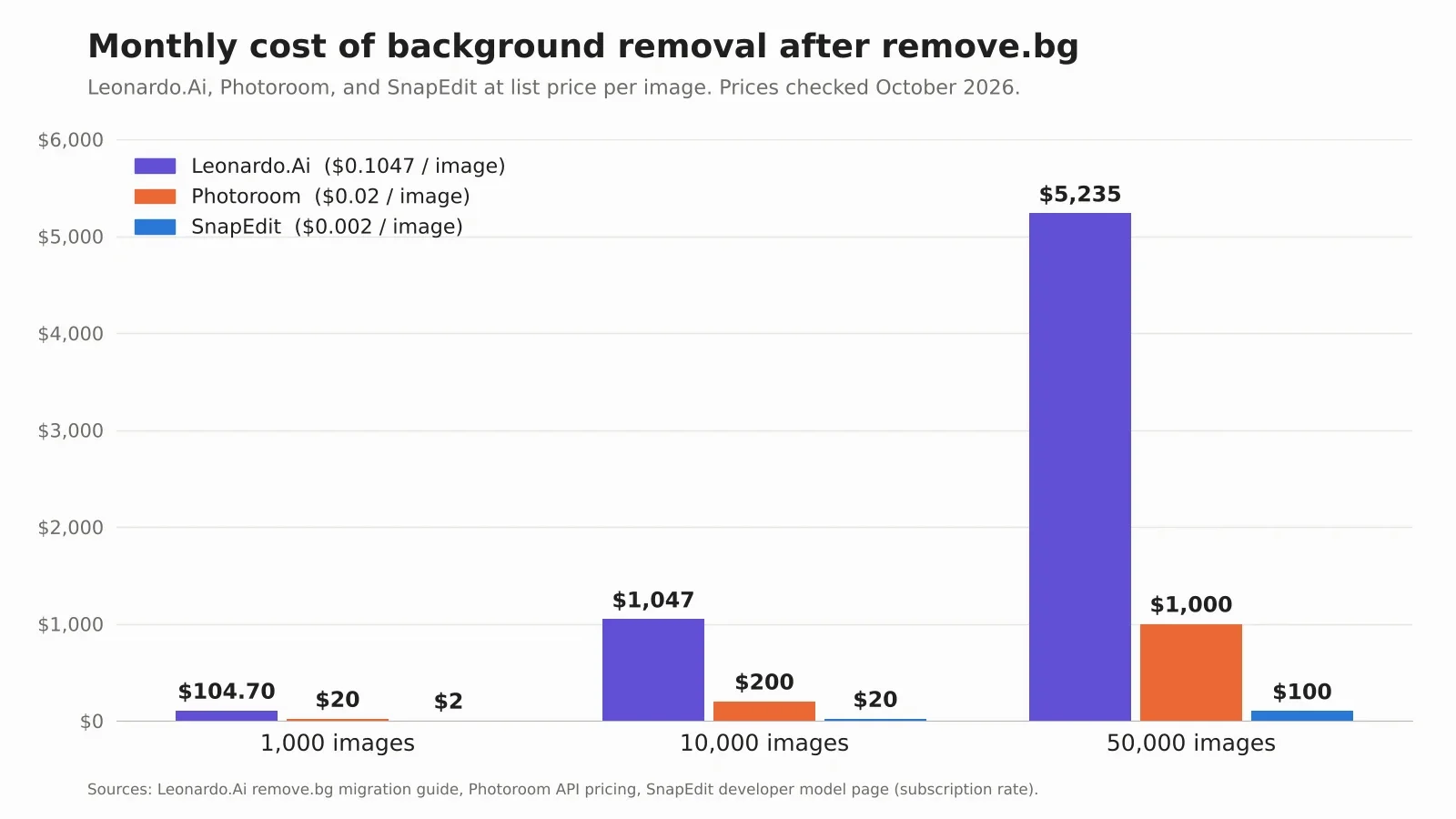
At 10,000 images a month, the gap is $1,047 on Leonardo.Ai, $200 on Photoroom, and $20 on SnapEdit. Over a year, that's the difference between $12,564 and $240.
SnapEdit's pay-as-you-go credits never expire, and subscription credits roll over while you stay subscribed. See the SnapEdit developer pricing page for current packs. For a deeper comparison of quality and speed across providers, see our background removal API comparison.
How do you switch from the remove.bg API to SnapEdit API?
You switch by changing four things: the endpoint, the API key header, the image field name, and how you read the response. The SnapEdit Remove Background API uses the same multipart upload and the same single synchronous call as remove.bg, so the structure of your code stays the same.
What changes in the request
| remove.bg | SnapEdit | Leonardo.Ai | |
|---|---|---|---|
| Endpoint | api.remove.bg/v1.0/removebg |
api.snapedit.app/v1/images/remove-background |
cloud.leonardo.ai/api/rest/v2/generationssync |
| API key header | X-Api-Key |
api-key |
Authorization: Bearer |
| Request body | Multipart form | Multipart form | JSON only |
| Image field | image_file or image_url |
input_image (file or URL) |
parameters.guidances.image_reference |
| Response | PNG image bytes | JSON with an image URL | JSON with an image URL or base64 |
| Mask output | channels=alpha |
output_type=mask |
Not covered in the migration guide |
| Error signal | HTTP status code | HTTP status code | Check the errors array, even on HTTP 200 |
SnapEdit accepts JPEG, PNG, and WEBP files up to 3000 × 3000 pixels. The average processing time is about 0.43 seconds per image. Each call uses 1 credit.
Before and after in cURL, Python, and JavaScript
cURL, before (remove.bg):
curl -X POST https://api.remove.bg/v1.0/removebg \
  -H "X-Api-Key: $REMOVEBG_API_KEY" \
  -F "[email protected]" \
  -F "size=auto" \
  -o no-bg.png
cURL, after (SnapEdit):
curl -X POST https://api.snapedit.app/v1/images/remove-background \
  -H "api-key: $SNAPEDIT_API_KEY" \
  -F "[email protected]" \
  -F "output_type=foreground"
SnapEdit returns JSON. The cutout is at data[0].url:
{
  "data": [
    {
      "url": "https://outputs.snapedit.app/outputs/abc123.png",
      "box": [10, 20, 300, 400]
    }
  ]
}
The box field gives the subject's bounding box as [x1, y1, x2, y2]. It's useful if you crop or center the product afterward.
Python, before (remove.bg):
import requests

response = requests.post(
    "https://api.remove.bg/v1.0/removebg",
    headers={"X-Api-Key": API_KEY},
    files={"image_file": open("image.jpg", "rb")},
    data={"size": "auto"},
)
png_bytes = response.content
Python, after (SnapEdit):
import requests

response = requests.post(
    "https://api.snapedit.app/v1/images/remove-background",
    headers={"api-key": API_KEY},
    files={"input_image": open("image.jpg", "rb")},
    data={"output_type": "foreground"},
)
response.raise_for_status()
png_bytes = requests.get(response.json()["data"][0]["url"]).content
JavaScript, before (remove.bg):
const formData = new FormData();
formData.append("image_file", imageFile);

const response = await fetch("https://api.remove.bg/v1.0/removebg", {
  method: "POST",
  headers: { "X-Api-Key": API_KEY },
  body: formData,
});
const pngBlob = await response.blob();
JavaScript, after (SnapEdit):
const formData = new FormData();
formData.append("input_image", imageFile);
formData.append("output_type", "foreground");

const response = await fetch("https://api.snapedit.app/v1/images/remove-background", {
  method: "POST",
  headers: { "api-key": API_KEY },
  body: formData,
});
const { data } = await response.json();
const pngBlob = await (await fetch(data[0].url)).blob();
In each language, three lines change and one line is added to download the PNG. Everything around the call stays as it is.
Tip: If remove.bg is called from many places in your code, wrap the SnapEdit call in one function that returns PNG bytes, like remove.bg did. Then the rest of your code doesn't need to change at all.
Which remove.bg parameters have no SnapEdit equivalent
SnapEdit's background removal API has two parameters: input_image and output_type. If your integration uses other remove.bg options, handle them in your own code.
| remove.bg parameter | What to do with SnapEdit |
|---|---|
size (preview, full, 50MP) |
SnapEdit returns the cutout at the input size. Inputs larger than 3000 × 3000 px need to be downscaled before the call. |
type (person, product, car) |
Not needed. SnapEdit detects the subject automatically. |
format (png, jpg, webp, zip) |
SnapEdit returns a PNG. Convert it in your code if you need another format. |
bg_color, bg_image_file, bg_image_url |
Composite the cutout onto a color or image in your code, for example with Pillow or Sharp. |
crop, crop_margin, scale, position |
Use the returned box coordinates to crop and position the subject. |
image_file_b64 |
Send the file as multipart, or pass a public image URL in input_image. |
channels=alpha |
Use output_type=mask. |
If your pipeline depends on 50-megapixel output or on server-side backgrounds in a single call, test carefully before you switch. For standard cutouts, the two parameters cover the job.
How do you migrate before December 1 without downtime?
Plan the switch in six steps. Finish by November 30, so the old key never fails in production.
- Find every place that calls remove.bg. Search your code for
api.remove.bg, then check Zapier, Make, n8n, store plugins, and scheduled scripts. The no-code ones are the easiest to forget. - Use your remaining remove.bg credits. Run pending batches now, while the old API still works.
- Get a SnapEdit API key and run both APIs in parallel. Send a share of real images to SnapEdit and keep remove.bg as the live output.
- Compare the results by image type. Check hair, glass, logos, and products with shadows at full size. Note any category that needs extra handling.
- Switch your traffic. Move all calls to SnapEdit before November 30, then remove the old key from your code and settings.
- Watch for 429 responses in the first week. A 429 means you hit the rate limit or ran out of credits. Retry with backoff and set an alert for a low credit balance.
Is SnapEdit's quality close enough to remove.bg?
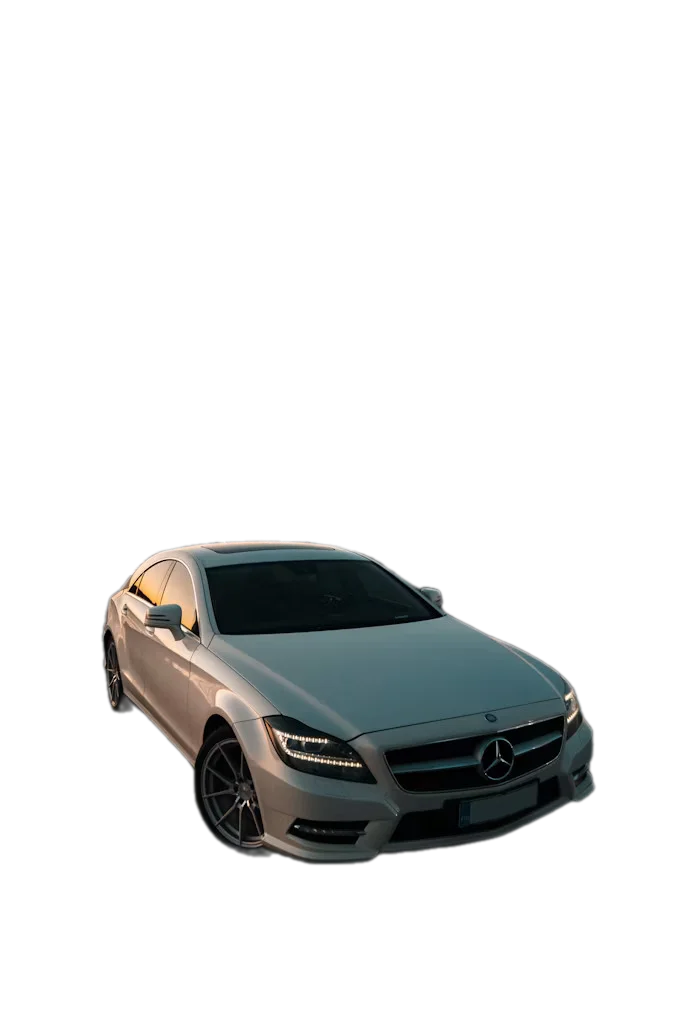
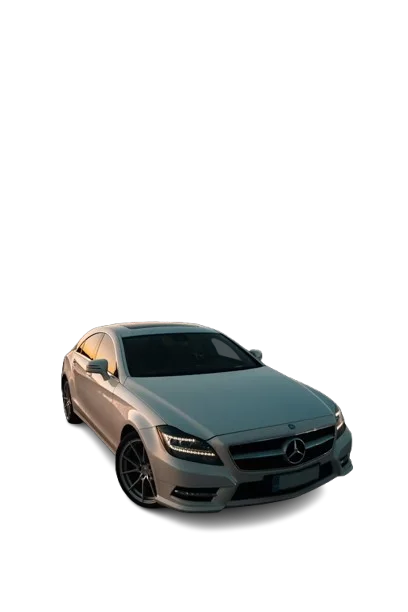
For most product photos, yes. In our background removal API comparison, SnapEdit and remove.bg produced similar results on solid products with clear edges. remove.bg did better on two hard cases: a car with natural shadows and small logo text.
Each image ran once through each API's default model, with no retries and no parameter tuning.
| Test case | Original | SnapEdit | remove.bg | What we saw |
|---|---|---|---|---|
| Jewelry |  |
 |
 |
Both clean |
| Footwear |  |
 |
 |
Both clean |
| Car with shadows |  |
 |
 |
remove.bg ahead: more natural shadow handling |
| Transparent glass |  |
 |
 |
remove.bg ahead: less pink tint on the glass |
| Logo and text |  |
 |
 |
remove.bg ahead: sharper subtext |
Solid products come out the same. Jewelry and shoes produced clean cutouts on both APIs. Most catalog photos fall into this group.
remove.bg handles cast shadows better. On the car, remove.bg produced the most natural result. Vehicle and other shadow-heavy listings should be tested closely.
remove.bg keeps fine detail sharper on glass and small text. SnapEdit kept the full logo, but rendered the subtext slightly soft, and left more background color on the glass.
A benchmark of a few images can't predict your catalog, and SnapEdit published this one. Run your own images through both APIs during step 3 of the migration.
Frequently asked questions
Will my remove.bg API key work after December 1, 2026?
No. The remove.bg API stops on December 1, 2026, and Leonardo.Ai states that remove.bg credentials don't carry over. You need a new key from whichever provider you move to.
What happens to my unused remove.bg credits?
remove.bg hasn't published a clear statement about unused API credits after the shutdown. Check your balance in your remove.bg account and use the remaining credits before December 1.
Does Canva have a background removal API?
The remove.bg website moves into Canva, but the API moves to Leonardo.Ai, which is also part of Canva. For API access, remove.bg points users to Leonardo.Ai.
What is the cheapest alternative to the remove.bg API?
Among hosted APIs, SnapEdit costs $0.002 per image on a subscription and $0.003 pay as you go. That compares with $0.0727 to $0.225 on remove.bg subscriptions today and $0.1047 on Leonardo.Ai.
How long does it take to switch from remove.bg to SnapEdit?
A standard integration changes four lines: the endpoint, the API key header, the image field name, and the response handling. Most teams can switch in under an hour. Plan a few days of parallel testing before December 1.
How do I get free credits to test the SnapEdit API?
Every new developer account gets 100 free credits with no credit card required. Businesses can email [email protected] with their company name and monthly image volume to get 1,000 free credits through SnapEdit's business promo.
Moving off remove.bg before December 1? Get a SnapEdit API key and test your first 100 images free. Testing for a business? Email [email protected] to get 1,000 free credits and finish your switch before the deadline.