The Workflow page gets one question more than any other: builder or API? Fair question, and it deserves a real answer, not just a feature list.
Short version. Neither one is "better." They solve different problems for different teams, and you can start with one and move to the other later without losing anything.
What's the Difference Between a Workflow Builder and an API?
A workflow builder is a visual interface. You drag editing steps onto a canvas, remove background, generate a new one, enhance, crop, connect them in order, and run the sequence on your photos. No code, no setup outside the browser.
An API is a set of endpoints your own system calls directly. A developer writes a request, sends a photo, gets an edited result back, and wires that into whatever app, CMS, or pipeline your business already runs on.
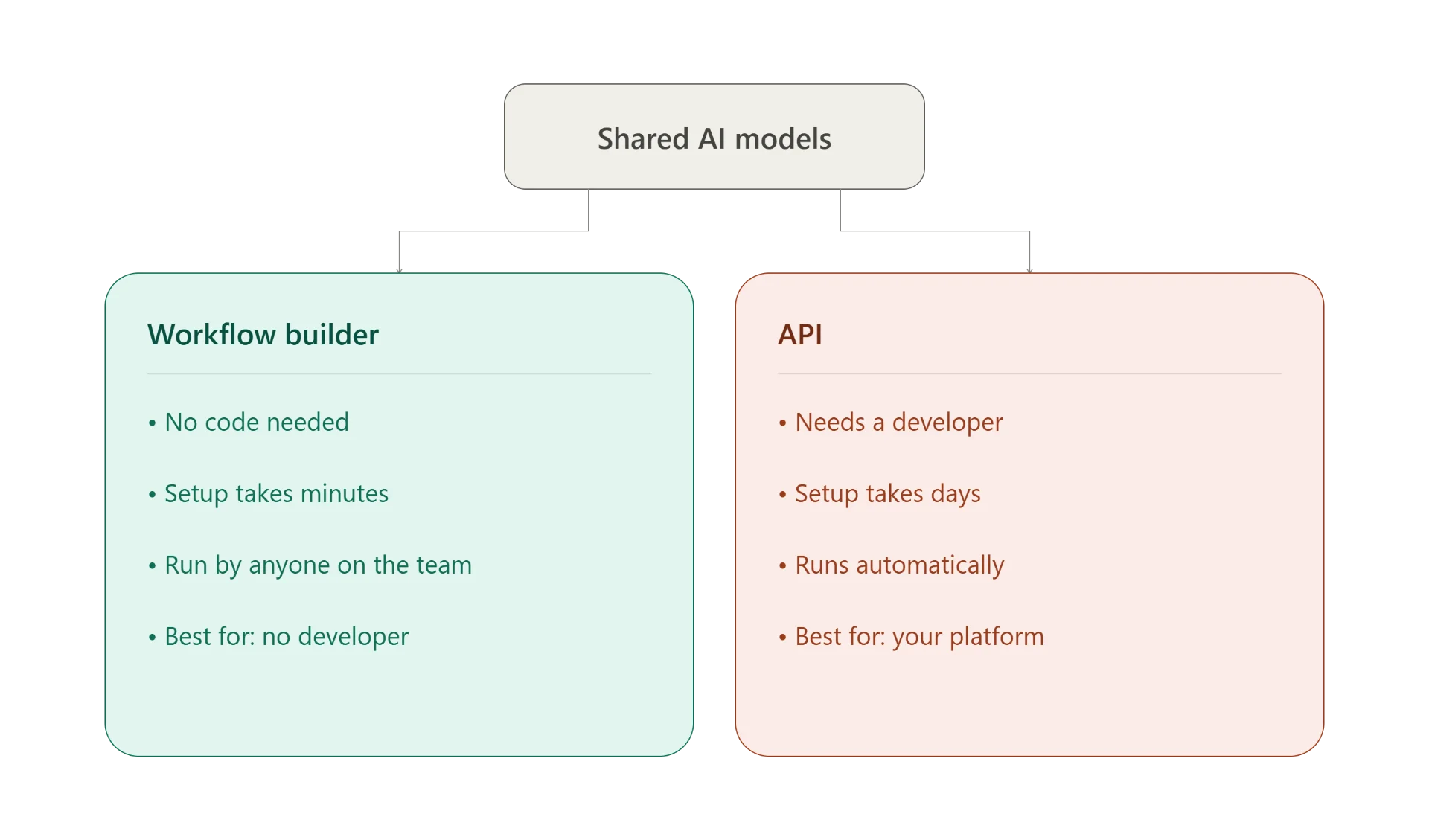
Same AI models power both. The only real difference: one has a visual interface sitting on top, the other doesn't.
Workflow Builder: Pros and Cons
Pros
- No coding knowledge needed, anyone on the team can build and run a workflow
- Setup takes minutes, and you see the result immediately on screen
- Easy to rearrange steps or swap one out, no code to touch
Cons
- Limited to the steps SnapEdit has already built, no custom logic outside that set
- Doesn't connect automatically into your own systems, CMS or marketplace, you still upload and download manually
- Not built for conditional logic, "if photo A, do X, if photo B, do Y" isn't something a visual canvas handles well
API: Pros and Cons
Pros
- Plugs directly into a system, app, or pipeline you already have running
- Full control over logic, you can add conditions, error handling, or chain it with other APIs
- Can run fully unattended, no one needs to click a button each time
Cons
- Needs a developer to build and maintain
- Longer setup time upfront, plus testing before it's safe to run in production
- When something breaks, you need someone who can read the code to fix it, not just click around a UI
When the Workflow Builder Is the Right Choice
Picture a seller just starting out on Amazon or Etsy. No developer on the team, no budget for one either. Twenty to forty new product photos land every week, each one needing the same treatment: background removed, a clean new background generated, image sharpened before it goes on the listing.
That's the exact shape of problem Builder solves. Upload the batch, run the saved workflow, download the results, list the products. No code, no waiting on anyone else's schedule.
Same logic applies to a small agency managing photos for a handful of clients. Each client wants a slightly different look, and the person doing the editing needs to adjust the workflow fast, today, without filing a ticket to a developer.
The common thread: small to mid-size teams, no in-house developer, and a process that doesn't need to plug into anything else.
When the API Is the Right Choice
Picture a marketplace platform a team has built themselves, where sellers upload their own product photos. The moment a photo lands, it needs a background removed and resized to spec, automatically, before it ever reaches a human.
That's a job for the API. No one's opening SnapEdit and clicking run. The photo hits an endpoint the moment it's uploaded, gets processed, and the result flows straight back into the platform.
Same logic applies to a team with an existing product information system or CMS. They don't want a separate upload-download step sitting outside their process. They want the image edit to happen as one link in a pipeline that already exists, triggered the same way every other step in that pipeline is triggered.
Once you've decided to call the API directly, the next decision is which provider to call. See how SnapEdit's background removal API compares to Photoroom, Remove.bg, and others on quality and price before you commit.
The common thread: the edit needs to happen inside a system you already run, without a person in the loop.
Can You Start With One and Switch to the Other Later?
Yes, and this is worth knowing before you decide anything. Builder and API call the same underlying models. Moving from one to the other isn't starting over, it's changing how you connect to work you've already validated.
A common path: start with Builder while volume is manageable and there's no developer involved yet. Once volume grows, or the business builds its own platform and needs the edit to happen automatically inside it, move that same logic over to the API.
Nothing about your results changes in that move. Only the trigger changes, from a person clicking run to a system calling an endpoint.
Cost and Setup Time, Side by Side
| Workflow Builder | API | |
|---|---|---|
| Setup time | Minutes | Days, first integration |
| Coding required | None | Yes, developer needed |
| Who runs it | Anyone on the team | Your own system, unattended |
| Best for | Small to mid-size teams, no developer | Teams with an existing platform or pipeline |
| Ongoing work | None, adjust the canvas as needed | Maintained by your dev team |
If your batch of photos connects to nothing else and a person is fine clicking run, start with Builder. If the edit needs to happen automatically inside a system you already operate, start with the API.
Comparing SnapEdit's Builder to Other Automation Tools
Everything above compares SnapEdit's own two options against each other. If you're weighing SnapEdit's Workflow Builder against a general automation tool like n8n or Make instead, that's a different question with a different answer. Our guide on automating batch photo editing covers that comparison in depth, including where a general automation builder pulls ahead and where it doesn't.
Frequently Asked Questions
Can the Workflow Builder handle complex logic?
Not really. It's built for a straight sequence of steps, upload, edit, export. If you need conditional branching, "do X only if the photo has a white background," that's an API job.
Do I need a developer to use the API?
Yes. The API is a set of endpoints meant for a developer to call from your own code. If you don't have one on your team, the Workflow Builder gets you the same editing results without that requirement.
Will switching from Builder to API mean rebuilding everything?
No. The AI models are identical. You're rebuilding the trigger, not the editing logic itself.
How do I know which one fits my team?
Ask two questions. Does a person need to click a button each time, or does this need to run automatically inside a system you already have? And, is there a developer on the team to build and maintain it? Those two answers point you to the right choice almost every time.
The Bottom Line
Builder and API aren't competing products. They're two doors into the same room.
If your team is small, moves fast, and doesn't have a developer to spare, start with Workflow Builder. If you're building your own platform and need the edit to happen automatically inside it, start with the API documentation instead. Either way, the same AI is doing the work underneath.