Photos play a major role in real estate marketing. In fact, 81% of buyers say listing photos are the most useful feature when searching for a home online, according to the National Association of REALTORS®' 2025 Profile of Home Buyers and Sellers.
While real photos remain essential for showing a property accurately, AI can offer another way to make those photos more engaging. An AI background generator can create new backgrounds around an existing property photo, helping agents produce more polished visuals for social media, advertising, and other marketing materials.
Worth clarifying upfront: this is different from virtual staging, which adds furniture into an empty room. A background generator changes what's around the property, sky, landscaping, atmosphere, not what's inside it. Both fall under the same disclosure rules covered later in this guide.
Let's explore when AI-generated backgrounds make sense for real estate, useful prompts to try, how to use them without misrepresenting a listing, and how they compare with traditional photography.
How AI background generators work in real estate photography
An AI background generator uses artificial intelligence to create a new background around an existing image based on a text prompt. For real estate, this can mean turning a plain yard into a more polished landscape, creating a warmer outdoor atmosphere, or producing a cleaner visual for a marketing campaign, all while keeping the property itself as the main subject.
The key is understanding what AI should and shouldn't change. AI-generated backgrounds can enhance the presentation of a property, but they shouldn't change the reality of the property.
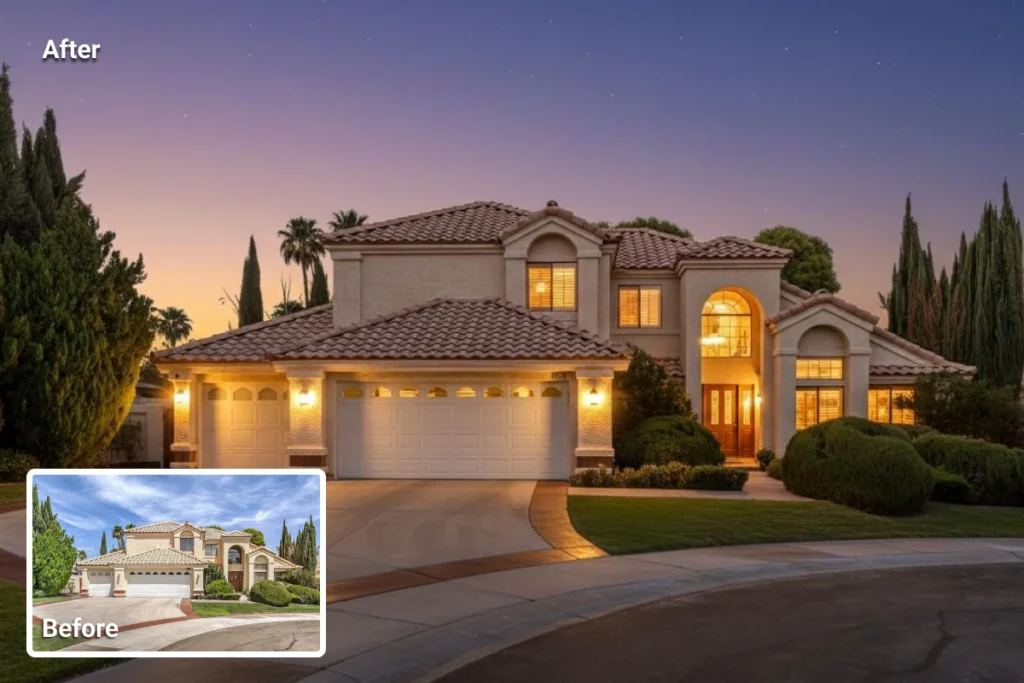
For real estate marketing, AI backgrounds can be useful for creating visual variations of an existing property photo. An agent might use one to:
- Create a more polished setting around a home
- Replace a distracting or visually plain background
- Create seasonal marketing visuals
- Develop social media and advertising creatives
- Give vacant properties more visual context
- Experiment with different lighting and outdoor atmospheres
For example, a real photo of a house could be paired with a clean landscaped garden and soft morning light to create a more engaging promotional image.
Real estate buyers need accurate information, so AI shouldn't be used to fabricate features or characteristics that don't exist. This is also why AI-generated backgrounds shouldn't replace the original listing photos. Real photography shows buyers what the property actually looks like, while AI can help create additional marketing visuals around that reality.
→ Real photos are the source of truth, and an AI background generator is a creative layer for marketing.
5 ways AI backgrounds can enhance real estate marketing
AI-generated backgrounds aren't a replacement for professional real estate photography, but they can be useful when the goal is to create more engaging marketing content.
Create more eye-catching marketing images. A strong property can still be held back by an overcast sky, plain landscaping, or a distracting background. AI can create a cleaner, more polished setting for social media, ads, or promotional materials.
Market vacant properties. Empty properties can feel less inviting in photos. An AI-generated background can add a sense of lifestyle and atmosphere, helping marketing content feel more compelling without changing the property itself.
Create social media content. Turn one real property photo into multiple creative assets for Instagram, Facebook, email campaigns, digital ads, or "Coming Soon" posts.
Create seasonal marketing campaigns. AI can create different visual moods, such as spring greenery, summer sunlight, or a warm golden-hour atmosphere, giving agents more flexibility for campaigns.
Improve photos with distracting backgrounds. If the property looks good but the surrounding environment takes attention away from it, an AI-generated background can create a cleaner composition while keeping the property as the focal point.
Using AI backgrounds without misrepresenting the property
Real estate carries a higher bar for photo accuracy than most categories, so a few rules keep AI backgrounds on the right side of that line:
- Change the context, never the structure. Sky, landscaping, and atmosphere are fair game. Roofline, windows, doors, siding, and lot size should come out identical to the original.
- Don't use it to hide a real flaw. A busy road out front or a neighboring building is a true characteristic of the property, not something to edit away.
- Keep AI versions out of the primary listing photos. MLS submissions should stay real, unaltered photography; save AI backgrounds for secondary marketing, social posts, ads, teasers.
- Compare before publishing. A quick side-by-side with the original catches an overreaching edit before a client or buyer does.
- Treat any public-facing use as needing disclosure, not just MLS submissions. More on that below.
Best real estate AI background prompts
The quality of an AI-generated background depends heavily on the prompt. For real estate, the best prompts describe the setting, lighting, landscaping, and atmosphere while clearly telling the AI to preserve the property's original structure.
Here are a few prompts to try with SnapEdit's AI Background Generator:
Luxury suburban home
Create a realistic upscale suburban setting with a manicured green lawn, mature trees, elegant landscaping, soft morning sunlight, natural shadows, and professional real estate photography. Keep the house unchanged and preserve its original architecture and proportions.
Modern home
Create a clean, contemporary outdoor setting with minimalist landscaping, a neat lawn, subtle greenery, soft natural daylight, and realistic shadows. Keep the property unchanged and maintain the original perspective.
Warm golden-hour setting
Create a realistic golden-hour setting with warm sunlight, natural sky tones, subtle landscaping, realistic shadows, and premium real estate photography. Keep the property, architecture, windows, doors, and proportions unchanged.
Welcoming family home
Create a bright, welcoming residential setting with a healthy green lawn, mature trees, subtle garden landscaping, clear daylight, and a warm family-friendly atmosphere. Preserve the house exactly as shown.
Social media marketing image
Create a polished, realistic lifestyle background for this property with clean landscaping, balanced natural lighting, subtle depth, and enough negative space for marketing text. Keep the property unchanged and photorealistic.
Be specific about the mood you want, but avoid prompting AI to add features the property doesn't actually have. For more prompt styles beyond real estate, see our full library of AI background generator prompts.
Pros and cons of using AI backgrounds in real estate
AI backgrounds can make real estate marketing faster and more flexible, but they also come with real limitations and, increasingly, legal ones.
Pros
- More creative flexibility, different visual styles, seasons, and atmospheres from one existing photo.
- Faster content creation, no need to arrange another shoot for marketing variations.
- Useful for social media, quick variations for posts, ads, and campaigns.
- Potentially more cost-effective than booking additional photography.
Cons - Risk of misleading buyers if a generated background implies features or surroundings that don't exist.
- Less authentic than real photography, even a realistic AI image isn't the actual environment.
- Not suitable for primary listing photos, which should prioritize accuracy over creativity.
- Disclosure requirements, covered in detail next, and they're no longer optional in every market.
Disclosure rules you actually need to know in 2026
This is the part generic AI photo guides tend to skip, and it matters more here than almost anywhere else, because real estate advertising is regulated.
California's AB 723, in effect since January 1, 2026, requires a visible label on any listing photo materially altered or AI-generated, plus a link to the original image. Non-compliance can mean a misdemeanor and a Department of Real Estate citation of up to $2,500.
NAR's Code of Ethics applies more broadly than any single state law: AI edits that change how a property actually looks should be disclosed, regardless of whether your state has its own statute yet.
Individual MLSs often go further. Stellar MLS (Florida), Bright MLS (Mid-Atlantic), NorthstarMLS, and NTREIS all require disclosure directly on the image itself, not buried in a caption or agent remarks, which several MLS policies explicitly reject as insufficient.
Not every edit needs a label. The general line is enhancement versus material alteration: color correction, HDR blending, or brightening an overcast sky typically doesn't require disclosure. Changing landscaping, swapping the sky, or anything an AI background generator does for marketing visuals generally falls on the "material alteration" side and should be labeled.
When in doubt, check your specific MLS's current policy before publishing, rules vary by market and continue to change.
How to use SnapEdit's AI Background Generator for real estate photos
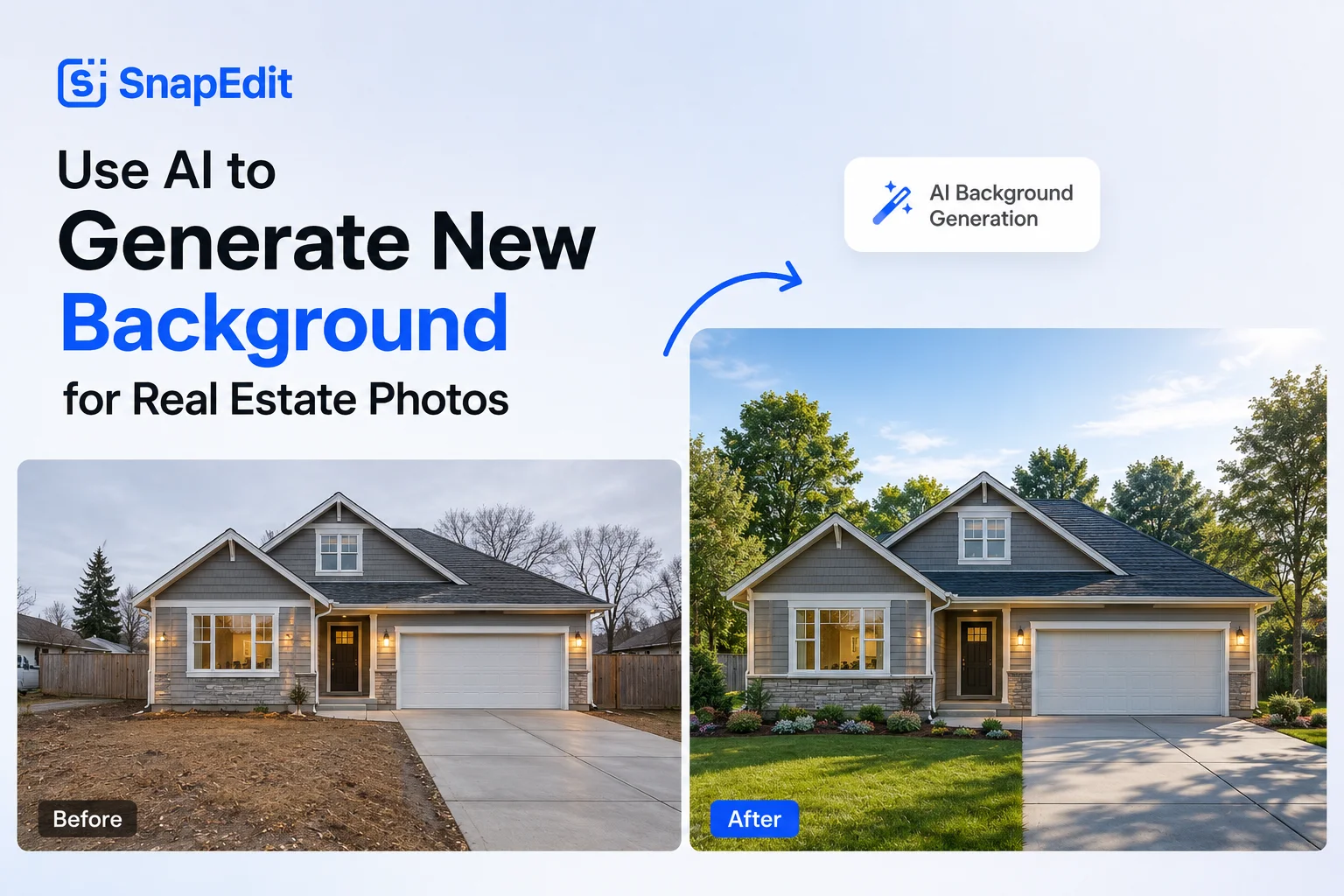
SnapEdit's AI Background Generator works from a text prompt: upload a property photo, describe the setting you want, and it generates a new background around the original subject. It runs in a browser, no software to install, and takes JPG, PNG, and WebP uploads.
- Upload a clear photo of the property.
- Describe the setting, lighting, and mood, and make sure the prompt doesn't introduce features the property doesn't actually have.
- Generate, and try a few prompt variations if the first result isn't right.
- Check it against the original: structure, proportions, and anything permanent should match.
- Use the result for secondary marketing, not as a replacement for your primary listing photos.
Beyond that, it's worth trying on your own property photos to see how it handles your specific listings.
For brokerages handling multiple properties, Workflow applies the same prompt across a batch instead of one image at a time. And if you're not sure whether you need a new background or just a cleaner cutout, our background generator vs. background remover guide covers when each is the right call.
FAQ
Do I have to disclose AI-generated real estate photos?
In most markets, yes. Any edit that changes how the property actually looks, including AI-generated backgrounds, virtual staging, or object removal, generally needs disclosure under NAR's Code of Ethics, many MLS rules, and a growing list of state laws like California's AB 723.
Can I use AI-generated backgrounds as my main MLS listing photo?
It's best not to. Keep MLS submissions as real, unaltered photography, and save AI-generated versions for secondary marketing material like social posts and ads.
Does brightening the sky or correcting color count as AI alteration that needs disclosure?
Generally no. Standard enhancements like color correction and HDR blending are usually treated differently from material alterations like changed landscaping or a replaced sky, though exact rules vary by MLS.
Is SnapEdit's Background Generator the same as virtual staging?
No. Virtual staging adds furniture to an empty interior; SnapEdit's Background Generator changes the exterior setting, sky, landscaping, and atmosphere, around an existing property photo. Both fall under the same disclosure expectations.
Real photos remain essential for showing buyers what a property actually looks like, while AI-generated backgrounds can add flexibility to the way that property is marketed. With tools like SnapEdit's AI Background Generator, agents can turn existing property photos into new creative visuals for social media, advertising, seasonal campaigns, and other promotional content. The key is knowing where to draw the line: enhance the presentation without changing the facts, and disclose it when you do.